
Aiming Ball: How to Read It
The Aiming Ball (ABall) provides guidance on how to strike the cue ball to achieve the intended result shown in a drill. It communicates two things:
- Stroke speed
- Tip position (spin and follow/draw)
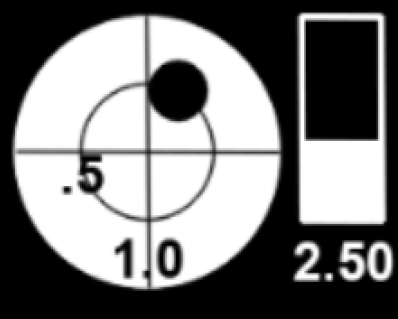
Figure: The ICATS Aiming ball.
(1/2 tip of right English, 1 tip of follow, speed of 2-1/2 tablelengths)
The Aiming Ball is a teaching aid. It is meant to guide execution, not replace decision-making.
What the Aiming Ball Represents
An Aiming Ball shows:
- Where to strike the cue ball
- How hard to hit the shot
Different equipment and strokes may produce slightly different results, but following the Aiming Ball guidance will help you execute the shot as the drill designer intended.
Speed Indicator
The speed indicator shows the recommended cue ball speed for the shot.
- Speed is shown on a numeric scale from 0.25 (very soft) to 6 (very hard)
- A speed of 1 corresponds to one table length
- A speed of 2 is roughly a typical lag shot (down-table and back)
- Many drills rely on speed control for correct cue ball position
Speed Control drills are provided to help you calibrate your stroke to your table and equipment.
Tip Indicator (Spin and Follow/Draw)
The tip indicator shows where to strike the cue ball.
There are two supported display formats.
X / Y Format (Default)
- X value → left/right English (side spin)
- Y value → follow or draw (top/bottom spin)
- Values are shown in tips
Example:
X = 0.5→ half tip of right EnglishY = 1.0→ one tip of follow
Clock Format (Optional)
The Clock format represents tip position using:
- O’clock position
- Number of tips
This format can be selected in Settings → Aiming Ball Style.
Both formats represent the same information; choose the one that is easier for you to visualize.
Showing and Hiding the Aiming Ball
- Press
Ato toggle the visibility of the Aiming Ball - Hiding the Aiming Ball is useful if you want to:
- Analyze the shot on your own
- Test your understanding before checking guidance
Important Usage Notes
- Not all drills include an Aiming Ball
- Some drills intentionally omit the Aiming Ball to encourage problem-solving
- When Statistics is active, the intended speed/spin may be captured for analysis
- The Aiming Ball does not account for every equipment or cloth variation — it is guidance, not a guarantee
Related Topics
-
Common Visual Aids
Learn how ghost balls, tangent lines, and cut angles work with the Aiming Ball. -
Shortcut Keys Reference
Keyboard shortcuts for showing and hiding the Aiming Ball. -
Drill Types: ICA, Image, and Hybrid
Understand which drills support editable Aiming Balls. -
Updates and New Modules
How new drills and updated guidance are delivered to your system. -
File Manager: Copy, Delete, Rename, Favorites
Organize and manage drills that include Aiming Ball guidance.