
Aiming Balls (ABalls)
An Aiming Ball gives the user suggested guidance on how to strike the cue ball to execute the shot correctly. It's one of the most important communication tools you have as a drill author — and once you understand its two indicators, it's straightforward to configure.
Add an ABall with Ctrl-A.
The Two Indicators
Every ABall has two visual indicators:
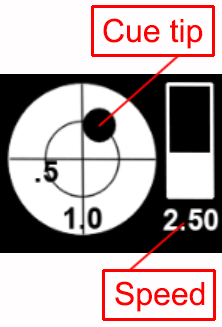
Speed
The speed indicator is a slider on the right side of the ABall. It represents how hard to hit the cue ball, measured in table lengths:
1= one full table length of travel2= a typical lag shot- Range:
.25(very soft) to6(very hard)
To adjust, Left-Click-and-Drag the slider up or down.
Cueing (Tip Placement)
The cue tip indicator is a small black circle near the center of the ABall. It shows where on the cue ball the tip should make contact:
- X-axis — tips of left or right spin
- Y-axis — tips of follow or draw
An alternate Clock representation is available through the Settings menu, showing the contact point as an O'Clock position with a tip count. Use whichever style matches your preference or your audience.
To adjust, Left-Click-and-Drag the black circle to the desired contact position.
Right-Click Menu
Right-clicking an ABall gives you three options:
Rotate — Adds a frame with circular control points. Left-Click-and-Drag a control point to rotate the ABall. Rotation is useful when you want the ABall's orientation to feel natural relative to the shot direction.
Flip Slider — Moves the speed slider to the opposite side of the ABall. Use this when the slider's default position overlaps with another element in your layout.
Remove — Deletes the ABall from the layout.

Positioning Tips
Don't drop the ABall just anywhere. Place it where the user's eye naturally falls when reading the layout — usually near the cue ball, but not so close that it interferes with Aiming Lines or Track Lines. Left-Click-and-Drag moves the ABall freely anywhere on the table.
Tip: If the speed slider is covering a line or another element, use Flip Slider before repositioning. It's faster than moving the ABall to the other side of the layout.